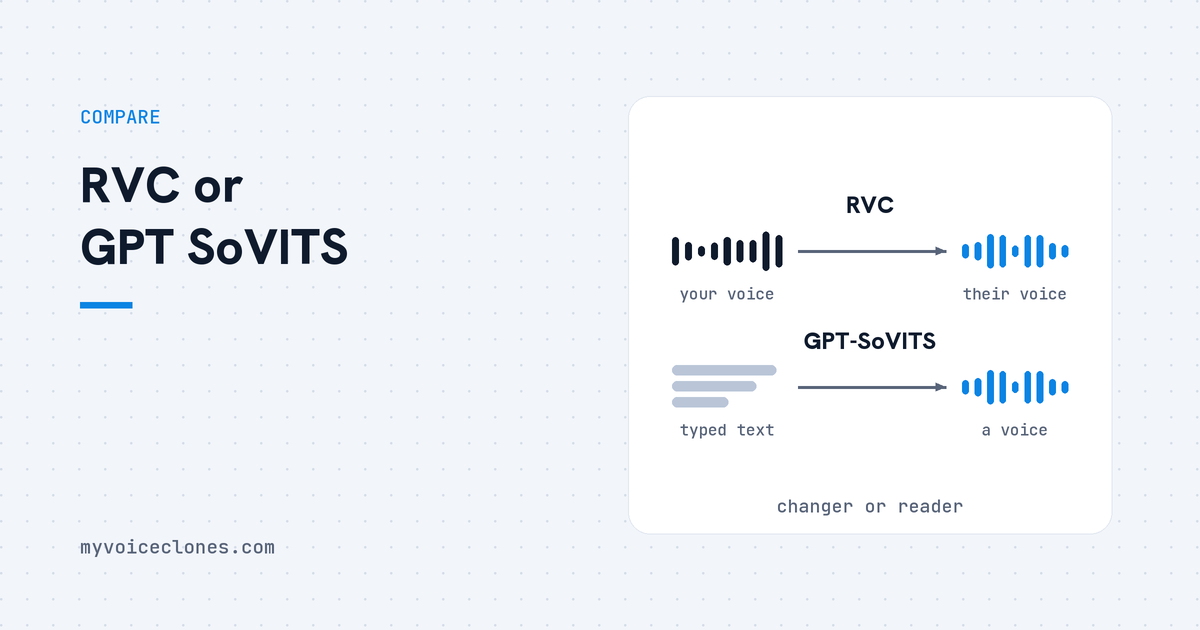
RVC and GPT-SoVITS are both free, open source voice cloning projects, but they do different jobs. RVC is a voice changer: you speak or sing, and it swaps your voice for the cloned one, fast enough for live use. GPT-SoVITS is text to speech: you type a script, and it reads it in the cloned voice. RVC needs a voice to start from, and GPT-SoVITS only needs text.
| Question | RVC | GPT-SoVITS | VoiceClone |
|---|---|---|---|
| What goes in | Your own voice, spoken or sung | Typed text | Typed text |
| What comes out | The same words in the cloned voice | The text read in the cloned voice | The text read in your cloned voice |
| Live, while you talk | Yes, 170 ms end to end, 90 ms with ASIO devices | No | No |
| Audio it asks for | 10 minutes or more of low noise speech | 5 seconds for a quick clone, 1 minute to fine tune | 1 to 3 minutes for the clone, 3 to 10 for training |
| Setup | Python, a web interface and commands | Python, a web interface and commands | A normal Windows app, no Python |
| Languages | Follows whatever language you speak | English, Japanese, Korean, Cantonese and Chinese | English only |
| Cost | Free, MIT license | Free, MIT license | Free for one voice, $49 once for everything |
By Inam, who built VoiceClone on GPT-SoVITS and keeps his own voice on his own PC. More of my engineering write ups live at designesh.com. Last updated 25 September 2026.
If you search for free voice cloning, two names keep coming up on GitHub and in YouTube tutorials: RVC and GPT-SoVITS. Most people assume they are two versions of the same thing and pick whichever video they watched first. They are not the same thing, and picking the wrong one means you install something that cannot do your job.
The difference is what you feed them. RVC takes a voice and changes it into another voice, the way a voice changer does. GPT-SoVITS takes text and speaks it, the way a screen reader does, only in a cloned voice. The surprising part is that both come from the same corner of the open source world, and the GPT-SoVITS project is published under the RVC-Boss account on GitHub.
If you want to talk or sing and come out sounding like someone else, use RVC. If you want to type a script and hear it read in a voice, use GPT-SoVITS.
What does RVC actually do?
RVC stands for Retrieval based Voice Conversion. Voice conversion means the words, the timing and the emotion all come from a real person speaking, and only the sound of the voice is swapped. So if you say "good morning" in a tired way, RVC gives you "good morning" in the cloned voice, still tired.
The project's own English README calls it a voice changer framework, and it ships a real time voice changing window. It says the delay from your microphone to the changed voice is 170 milliseconds, and 90 milliseconds with ASIO sound devices, which are the low delay audio drivers music producers use. That is quick enough to use live on a call or a stream, which the famous Real-Time Voice Cloning project on GitHub, despite its name, is not.
For training, the same page recommends 10 minutes or more of low noise speech of the target voice. It also includes a tool that separates vocals from music, and that is the first step if you want to make a song cover. This is the job RVC is really good at.
What does GPT-SoVITS do differently?
GPT-SoVITS is text to speech. You give it a sample of a voice, you type a sentence, and it produces that sentence in the voice, with nobody speaking it first. The GPT-SoVITS page on GitHub lists a quick clone from a 5 second sample, and fine tuning from 1 minute of audio for a closer match.
Fine tuning means the model studies your recording properly and saves what it learned, instead of guessing from a short clip every time. The same page lists English, Japanese, Korean, Cantonese and Chinese, and it says it can speak in a language that was not in the training audio. It also lists voice conversion among its tools, but text to speech is the main job it was built for.
The name tells you how it works, if you split it. The GPT part predicts what the speech should sound like from your text, word by word, and the SoVITS part turns that into real audio in the cloned voice. I explain those two halves in more detail in GPT-SoVITS in plain words.
Can RVC read text out loud?
Not on its own, and this is where most people get stuck. RVC needs a voice going in. If you only have a script, you first need something else to read it, either you reading it into a microphone, or a normal text to speech voice. Then RVC changes that voice into the cloned one.
Here is how the two routes compare for the same job, a 5 minute YouTube narration:
- With RVC: you read the whole script into a microphone, or you make a robot voice read it, and then you run it through RVC. Every pause, stumble and word the first voice said wrong is still there in the result, now in the new voice.
- With GPT-SoVITS: you paste the script and it reads it in the cloned voice. When a word comes out wrong, you change the text or make that line again. Nobody has to perform it.
So the honest rule is simple. If you are willing to perform every line yourself, RVC can work. If you want to write and not record, you need text to speech like GPT-SoVITS.
Which one should you pick for your job?
It depends on who is doing the talking. If there is always a real person speaking and you only want to change how they sound, RVC is the better tool. If the words start life as text, GPT-SoVITS is the better tool.
| Your job | The better fit | Why |
|---|---|---|
| Talking live on a stream or a call in another voice | RVC | It changes your voice while you talk |
| Making a song cover in a cloned voice | RVC | It follows your singing, pitch included |
| Reading YouTube scripts in your own voice | GPT-SoVITS | You type, it reads |
| Narrating an audiobook or a course | GPT-SoVITS | Hours of text, no hours of recording |
| Fixing one wrong word in a narration | GPT-SoVITS | You regenerate that line from text |
When I chose the engine for VoiceClone, this was the question that decided it. I write my scripts before I make a video, and I did not want to read each one twice, once for the microphone and once for the tool. So I needed something that starts from text, and that meant GPT-SoVITS.
Is either one hard to set up?
Both are free and both use the MIT license, which means you can use what you make with them, commercially too. But neither one is an app you double click. Both expect you to install Python, get the right versions of its libraries, download model files and run commands in a terminal, then use a web page that runs on your own computer.
A graphics card matters for both. RVC's page says it trains quickly even on weaker graphics cards, and it has a route for AMD and Intel machines through DirectML on Windows. GPT-SoVITS runs best on an NVIDIA card with CUDA, which is the toolkit those cards use. Both work on a plain processor, but slowly.
Where does VoiceClone fit in?
VoiceClone is GPT-SoVITS inside a normal Windows app for Windows 10 and 11, so there is no Python and no terminal. You record 1 to 3 minutes of normal talking, and before any cloning starts the app checks that recording for noise, clipping and volume. Then you type, and it reads your script in your voice. It makes several takes, listens to each one with a speech recognizer, and grades every word, so you can fix a single wrong word and keep the rest.
The Make it perfect button trains a true copy of your voice on your own PC, and that takes under an hour on a normal NVIDIA card. Everything stays on your computer, and after the one time setup download of about 1.3 GB it works fully offline. It is free to clone and fully train one voice and then generate 3 times, and the $49 one time license opens the rest.
Now the part where RVC wins, because it does. VoiceClone does not change your voice live, it cannot sing, and it speaks English only. If you want a live voice changer or song covers, VoiceClone is the wrong tool and RVC is the right one. If you want your scripts read in your own voice without renting it, that is exactly what I built VoiceClone for.
FAQ
Is RVC text to speech?
No, RVC is voice conversion. It changes a voice that is already speaking into the cloned voice. To use it with a script, something has to read the script first, either you or a normal text to speech voice.
Can GPT-SoVITS change my voice in real time?
Not as a live voice changer. Its page lists voice conversion among its tools, but it is built for text to speech, where you type and it reads. For live changing while you talk, RVC's real time window is the tool made for it.
Which needs less audio, RVC or GPT-SoVITS?
GPT-SoVITS asks for less audio, because its page lists a quick clone from 5 seconds and fine tuning from 1 minute, while RVC recommends 10 minutes or more of low noise speech for training.
Are RVC and GPT-SoVITS free for commercial use?
Both projects use the MIT license, which allows commercial use of the software. The voice is a different question, because you still need to own it or have clear permission from the person it belongs to.
Sources: the RVC project's English README and license on GitHub, and the GPT-SoVITS project page and license on GitHub. I read all of them on 25 September 2026.
Hear your own voice come back.
The free Windows app clones and fully trains one voice, yours, on your own PC. No account, no upload, and the download starts right away.